Full Feature Guide

Every feature, explained in full.

The complete reference for everything DriveHub does — diagnostics, AI, navigation, CarPlay, Android Auto, trip scoring, maintenance tracking, Drive Mode, Apple Watch and crash safety. If a feature exists in the app, it's documented here.

🍎 iOS 16+ · iPhone · CarPlay · Apple Watch 🤖 Android 8+ · Phone · Android Auto
🛠️ OBD-II Diagnostics 🤖 AI Copilot 🗺️ Navigation ⚙️ CarPlay & Android Auto 🏆 Trip Scoring ⛽ Vehicle & Fuel 🌙 Drive Mode & Watch 🎥 Dashcam 🚨 Crash & SOS Safety 🏍️ Multi-Vehicle & Motorcycle 🔍 Pre-Purchase Inspection 🧩 Smarter Tools
01 — DIAGNOSTICS · iOS & Android

Live OBD-II, decoded properly.

DriveHub pairs with any ELM327-compatible Bluetooth (or Wi-Fi) OBD-II adapter — the same $15–30 dongles sold for any car, truck, or motorcycle — and turns the raw CAN bus data into something you can actually read. Works on both iOS and Android.

  • 12 live PIDs monitoredSpeed, RPM, coolant temperature, fuel tank level, battery voltage, engine load, intake air temp, throttle position and more — refreshed continuously while connected on both iOS and Android.
  • Diagnostic Trouble Codes (DTCs)Read and clear Active, Pending (Mode 07), and Permanent (Mode 0A) fault codes directly from your phone — no separate scan tool needed.
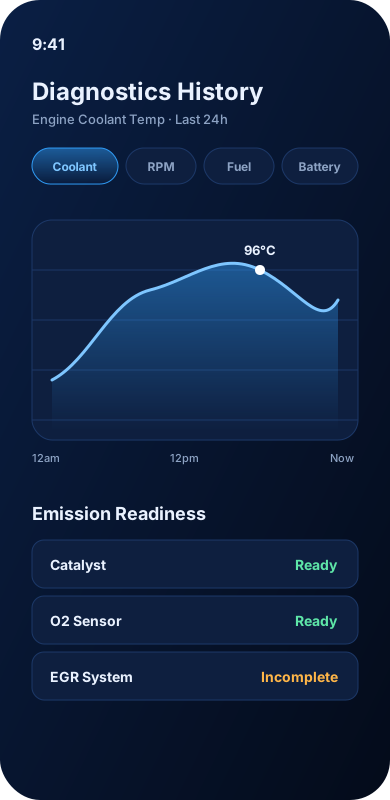
  • Emission readiness monitorsSAE J1979-compliant decoding of Catalyst, Heated Catalyst, EVAP, O2 Sensor & Heater, EGR and more, so you know if your vehicle will pass an emissions inspection before you go.
  • Historical trend chartsEvery reading is quietly persisted — to iCloud on iOS (SwiftData + CloudKit), or SQLite on Android (Drift ORM). Browse interactive charts for any PID over days, weeks, or months.
  • Bluetooth & Wi-Fi adapter supportWorks with OBDLink, Veepeak, Vgate, BlueDriver, FIXD, Carista, Autel, Foxwell, XTOOL and most generic ELM327 clones. iOS supports BLE and MFi adapters; Android supports BLE, Bluetooth Classic SPP, and Wi-Fi.
SAE J1979ELM327Bluetooth LE & ClassicWi-Fi 🍎 SwiftData + CloudKit 🤖 Flutter + SQLite
DriveHub OBD-II historical chart and emission readiness monitor list

Real-Time Cluster

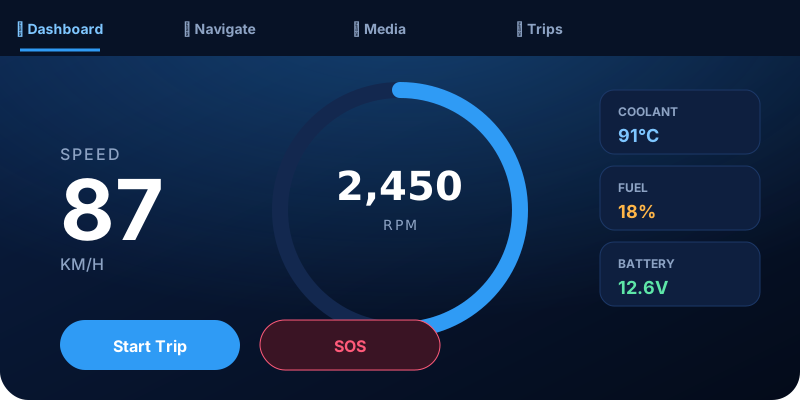
Speed, RPM, coolant, fuel and battery voltage on one glanceable screen, mirrored to CarPlay (iOS) or Android Auto.

Clear Codes On The Spot

Clear DTCs after a repair without a trip to the shop — confirmation step included to prevent accidental clears.

Pre-Inspection Confidence

Know your emissions readiness status before you book a state inspection appointment.

02 — AI COPILOT · iOS & Android

An assistant that knows your car, not just chat.

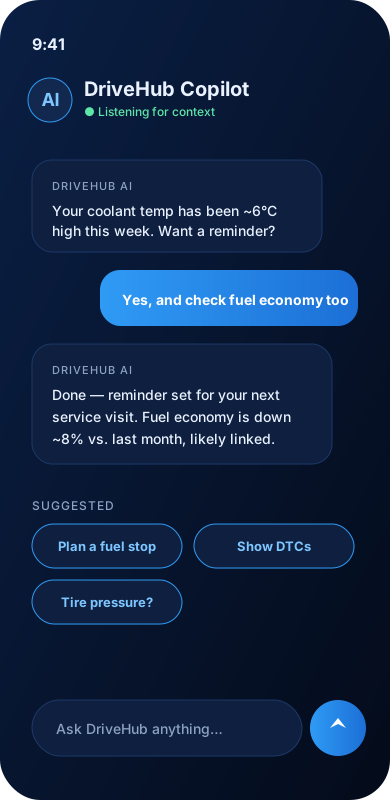
DriveHub's AI Copilot is fused with your live OBD data, trip history and location — so it answers with your vehicle's actual state, not a generic guess. Available on both iOS and Android.

DriveHub AI Copilot conversation
  • Context-aware quick promptsSuggested questions change based on what's actually happening — low fuel, a new fault code, an unusually high coolant temp.
  • Hands-free voice inputSpeak your question instead of typing, so your eyes stay on the road. Works on both iOS and Android.
  • Persistent conversation historyConversations are saved on-device. On iOS, synced via CloudKit so they're available on all your Apple devices. On Android, stored locally and exportable.
  • Plain-language diagnosticsAsk "why is my check engine light on?" and get an explanation in plain English, not a four-digit code.
🍎 iOS: AI conversation history syncs silently across all your Apple devices via CloudKit.
🤖 Android: AI history stored locally on-device and can be exported to CSV.
04 — IN-CAR DISPLAY

Native on the big screen, not a port.

DriveHub connects natively to both Apple CarPlay and Android Auto — bringing live diagnostics, navigation controls, and safety features directly to your head unit, built specifically for each platform.

🍎

Apple CarPlay

DriveHub's CarPlay experience runs under Apple's Driving Task category — a live vehicle status screen built specifically for diagnostics and safety apps, refreshed twice a second, with one-tap access to trip history and SOS.

Live Speed & RPM Coolant, Fuel & Battery 0.5s Refresh Rate Recent Trips List One-Tap SOS

Requires iPhone with iOS 14+ and a CarPlay-compatible head unit. Pair via USB or CarPlay wireless.

🤖

Android Auto

DriveHub's Android Auto integration projects navigation templates to your head unit — keeping your eyes on the road while the app monitors your vehicle in the background via Bluetooth OBD-II.

Navigation Templates Background OBD Monitoring Trip Auto-Detection Manual Start/Stop Trip Hands-Free Safe Driving

Requires Android 8.0+ and an Android Auto-compatible head unit, or the Android Auto app on supported phones.

DriveHub CarPlay dashboard cluster with live speed, RPM gauge, coolant, fuel and battery
05 — TRIP SCORING · iOS & Android

Every drive, graded like a report card.

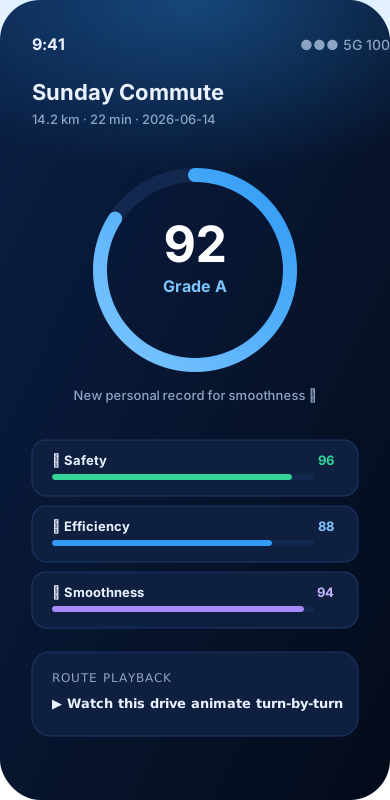
DriveHub scores each trip from 0–100 across three dimensions, with a letter grade, personal-record tracking, and a full animated playback of the route you just drove. Works on both platforms.

DriveHub trip detail screen with driving score 92, grade A, and safety, efficiency, smoothness bars
  • Safety scoreTracks hard braking, sharp cornering and speeding events relative to posted limits.
  • Efficiency scoreMeasures throttle smoothness, idle time and acceleration patterns that affect fuel economy.
  • Smoothness scoreRates how gently the vehicle was driven overall — fewer abrupt inputs, a higher score.
  • Personal recordsDriveHub flags new bests automatically — "New personal record for smoothness" — to keep good habits reinforced.
  • Animated route playbackWatch your exact route replay on the map after the fact, synced to the trip's speed and timing.
  • Auto trip detectionTrips start automatically when GPS speed exceeds 5 km/h for a sustained period, and save automatically when the vehicle stops. Manual Start/Stop override available on both platforms.
06 — VEHICLE & FUEL TRACKING · iOS & Android

Your garage, fully accounted for.

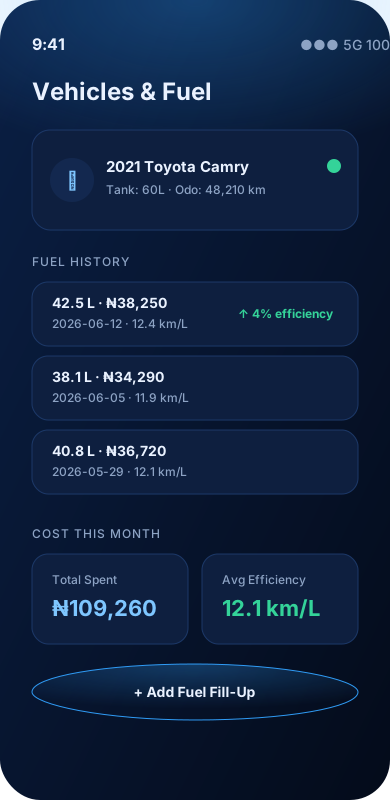
Add every vehicle and motorcycle you own, log fill-ups in seconds, and let DriveHub track cost-per-litre and efficiency trends automatically. Available on both iOS and Android.

  • Multiple vehicle profilesEach with its own make, model, year, fuel tank capacity, and odometer history. Free tier: 1 vehicle. Pro: unlimited.
  • Fuel fill-up loggingLog litres and cost in a few taps — DriveHub calculates km/L (or mpg) automatically from your last fill-up.
  • Fuel history & cost trendsSee monthly spend and average efficiency at a glance, with each fill-up timestamped and itemized.
  • Efficiency change alertsNotices and surfaces meaningful jumps in efficiency between fill-ups, good or bad.
DriveHub vehicle and fuel history screen
07 — DRIVE MODE, APPLE WATCH & NOTIFICATIONS

Stay focused. Stay connected.

Drive Mode silences distractions the moment you start moving. On iOS, Apple Watch and Live Activities keep essentials visible without unlocking your phone. On Android, the notification bar keeps trip status front and centre.

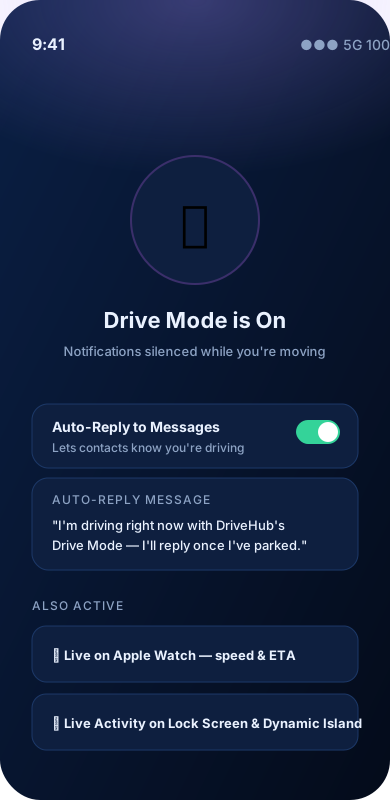
DriveHub Drive Mode screen with auto-reply and Apple Watch live stats
  • Drive Mode (both platforms)Automatically silences notifications while the vehicle is moving, reducing the temptation to glance at your phone.
  • Auto-reply to messages (both platforms)Sends a customisable auto-reply to incoming texts — "I'm driving right now, I'll reply once I've parked" — so people know you're not ignoring them.
  • Apple Watch companionLive speed and ETA on your wrist via WatchConnectivity, streamed directly from the active trip.
  • Live Activities (iOS 16+)Active navigation and trip status appear on the Lock Screen and Dynamic Island, so the next turn is visible without unlocking your phone.
  • Android persistent notificationA sticky notification shows live speed and trip duration throughout the drive, tappable to return to the app.
🍎 iOS exclusive: Apple Watch live stats, Lock Screen Live Activities, and Dynamic Island glance.
🤖 Android: Persistent foreground notification with live trip stats. Android Auto fills the head-unit role.
08 — DASHCAM · iOS

Always recording, never cluttered.

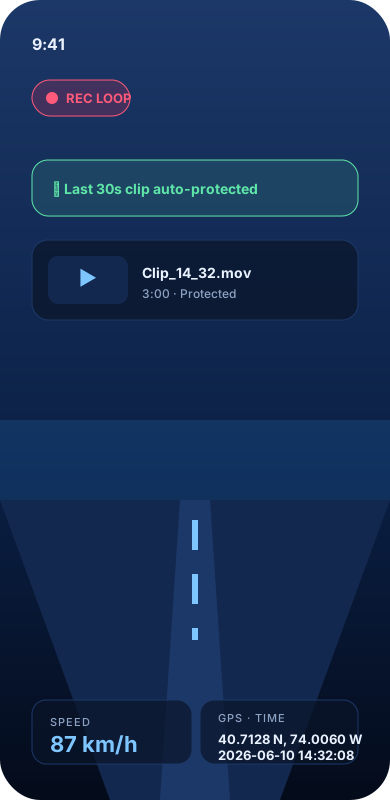
A loop-recording dashcam that overwrites old footage automatically, and instantly protects the last 30 seconds the moment a crash is detected. Currently available on iOS; Android dashcam is in development.

  • Continuous loop recordingOld footage is automatically overwritten so storage never fills up — no manual cleanup required.
  • Crash-triggered auto-saveThe last 30 seconds before a detected crash are instantly locked and protected from being overwritten.
  • Speed & GPS overlaysEvery clip is timestamped with speed and location, useful for insurance claims or incident review.
🍎 iOS only at this time. Android dashcam support is on the roadmap.
DriveHub dashcam loop recording with speed and GPS overlay
09 — CRASH & SOS SAFETY · iOS & Android

Protection that activates itself.

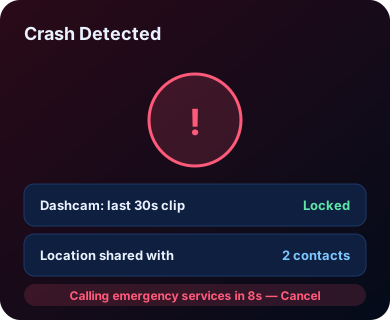
DriveHub watches for the moment you can't — automatically protecting footage, alerting contacts, and sharing your exact location. Crash detection and SOS work on both iOS and Android.

DriveHub crash detection and SOS screen
  • Automatic crash detection (both platforms)Motion and sensor fusion detect a likely crash and trigger the emergency flow without any input needed.
  • One-tap SOS (both platforms)Manually trigger an SOS at any time — on the phone or from the CarPlay screen — with a confirmation step to prevent accidental triggers.
  • Live location sharing (both platforms)Emergency contacts receive an SMS with a tappable map link to your exact location — not just coordinates.
  • Fatigue alerts (both platforms)Long, unbroken drives trigger a gentle reminder to take a break after 2 hours.
  • Parking spot memory (both platforms)DriveHub remembers where you parked, so you're never wandering a multi-level garage looking for your car.
  • Dashcam auto-protect (iOS)The 30 seconds before a detected crash are immediately locked and protected from loop overwrite.
10 — MULTI-VEHICLE & MOTORCYCLE SUPPORT · iOS & Android

One app, every vehicle in the garage.

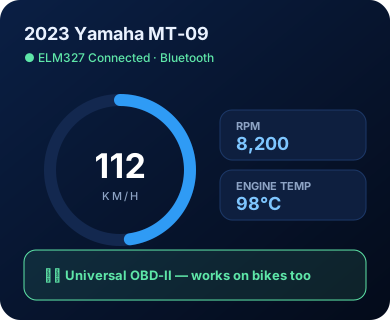
DriveHub works with any OBD-II-equipped vehicle — cars, trucks, and motorcycles of all types — with vehicle-specific safety features where it matters. Full multi-vehicle support on both iOS and Android.

  • Universal OBD-II compatibilityAny ELM327-compatible Bluetooth or Wi-Fi adapter works, regardless of vehicle make, on both iOS and Android.
  • Motorcycle lean-angle monitoring (iOS)A dedicated lean-angle screen with calibration and a configurable warning threshold, persisted across rides.
  • Per-vehicle trip & fuel historySwitch between vehicles and DriveHub keeps every trip, fuel log and diagnostic history correctly attributed — on both platforms.
  • Unlimited profiles on ProFree tier supports one vehicle profile; DriveHub Pro unlocks unlimited vehicles and motorcycles. iOS syncs via iCloud; both platforms also support an optional free DriveHub account that syncs your vehicle list across every signed-in device, iOS or Android, plus CSV export on Android.
DriveHub dashboard connected to a motorcycle via Bluetooth OBD-II
11 — PRE-PURCHASE INSPECTION · iOS & Android

Know before you buy, not after.

An 8-step guided inspection that turns your phone and an OBD-II adapter into a real pre-purchase check — idle diagnostics, a vehicle-specific visual checklist, an optional test drive, and an AI verdict: Buy, Negotiate, Caution, or Walk Away.

Idle diagnostics baseline

Full fault-code scan (active, pending & permanent), emission readiness monitors, and an idle baseline of coolant temp, RPM, fuel trims and battery voltage — captured in the first few minutes.

Vehicle-specific checklist

A tailored visual & mechanical checklist — panel gaps and frame rust for a car, tow-hitch and 4WD engagement for a truck, chain and fork seals for a motorcycle — not one generic list for every vehicle type.

Optional test drive analysis

Drive it and DriveHub logs the ride; skip the drive and the AI is told plainly it's evaluating a stationary vehicle only — it will never claim to have observed driving behaviour it didn't see.

Odometer authenticity check

Compares the ECU's own internal odometer (where supported) against the seller's stated mileage, and flags a real, deterministic red flag on any mismatch over 500 km — not an AI guess.

AI Buy / Negotiate / Walk Away verdict

Every finding is weighted by vehicle type — a rusted frame matters more on a truck, a worn chain matters more on a motorcycle — and rolled into one clear verdict with a plain-English summary.

Shareable PDF report

A branded, watermarked report covering the verdict, findings, fault codes and checklist — ready to send to a mechanic, a seller, or keep for your own records.

Vehicle Electronics Report

A sibling AI report that reads every current fault code and live reading together, organised by subsystem — ABS/Traction Control, transmission, body electronics and more, tailored per vehicle type — instead of decoding one code at a time.

Inspection history

Every past inspection is saved and browsable later — the verdict, the findings, and the PDF are never a one-shot view.
Free to try: your first Pre-Purchase Inspection is free on both iOS and Android — unlimited inspections are a DriveHub Pro benefit.
12 — SMARTER TOOLS · iOS & Android

The small things that add up.

A handful of quieter features that make daily driving with DriveHub feel more personal — and a used-car check feel more complete.

Drive Profiles

Switch between Eco, Sport, and fully custom profiles — each with its own scoring weights and speed-alert thresholds, so DriveHub grades you against how you actually intend to drive today.

Offline Maps

Download map regions ahead of time so turn-by-turn navigation keeps working the moment signal drops — on the highway, in a tunnel, or out of coverage entirely.

Weather Overlay

Live temperature and conditions on the navigation map itself, plus route-weather advisories so you know what's ahead before you're in it.

Home Screen Widgets (iOS)

Three widget sizes — small (speed & status), medium (trip summary), large (full dashboard) — refreshed automatically without opening the app.

Personal Records

Best driving score, longest trip, top speed, best fuel economy and total distance are tracked automatically and celebrated the moment you beat one.

Data Export

Export trip history, OBD readings and fuel logs to CSV — for insurance, fleet records, or just keeping your own archive.

Ready to drive smarter?

DriveHub gives any automobile the intelligence it deserves.

Download on theApp Store
Get it onGoogle Play
See Pricing